



Online invoice generator
Make invoices fast and easy with TransferGo’s free online tool. Just fill in your details, add items, and download your PDF in minutes.
What to include in
a professional invoice
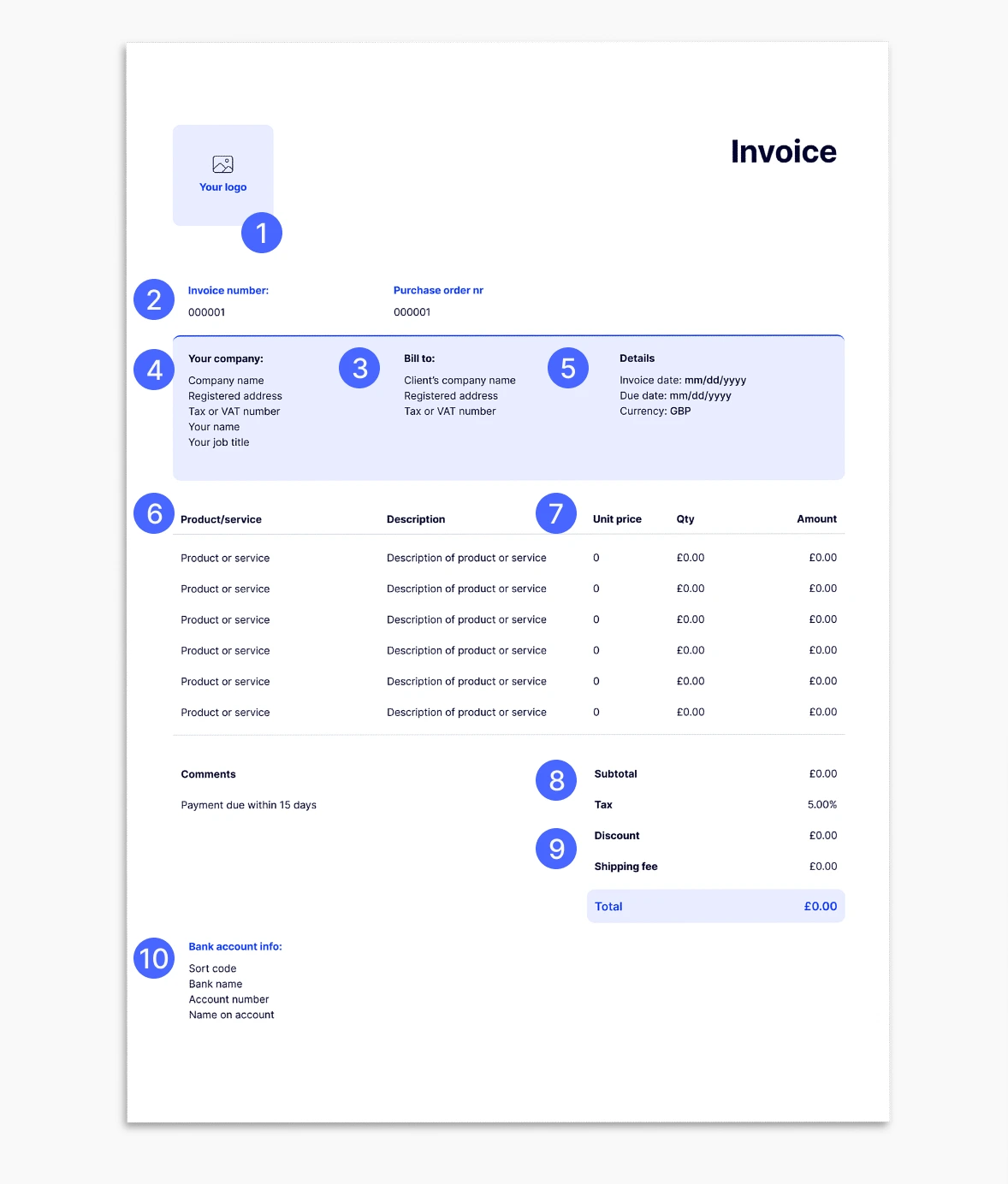
Every invoice should include these essentials:
1
Header & company logo
Brand your invoice with your business logo.
2
Invoice number
Keep track of payments with a unique ID.
3
Client name, address & contact details
Ensure your client knows it’s for them.
4
Your business information
Include your registered details.
5
Invoice date & due date
Show when it was issued and when payment is due.
6
Description of goods or services
Clear breakdown of what you’re charging for.
7
Unit price or rate
Per item/service pricing.
8
Taxes and fees
Add VAT or other applicable charges, and we’ll work out the total amount.
9
Total amount
The final amount owed.
10
Payment terms, bank details & instructions
How and when your client should pay.
Benefits of the TransferGo online invoice generator
100% free and easy to use
No sign-up required
Instant PDF download

Best for freelancers
And small businesses

Use your TransferGo account for quicker payments
Save time with our invoice maker

Manage your money
with TransferGo


Send from


Exchange Rate
– – –
GBP 1 = NGN 2030.28232
Transfer Fee
Free – – – 0.99 0.99 USD
Receiver gets


Powered by Moka United
Delivered in minutes
Frequently asked questions
What is an invoice?
An invoice is a document that lists goods or services provided, along with the amount due, and payment details. If you’re wondering how to make an invoice, you can use TransferGo online invoice generator to simplify the process.
Can I edit my invoices?
Yes, TransferGo’s free invoice generator allows you to adjust details before downloading your PDF. This way, you can adjust your invoice the way you need — quickly and easily.
Can I change the currency on the invoice?
Absolutely — when using TransferGo’s online invoice generator, you can select the currency you prefer.
Can I put my own logo on the invoice?
Yes, you can upload your logo to personalise your invoice.
How do I send my invoice?
Once you finish editing with the TransferGo online invoice generator, just download the PDF created from the invoice template and share it via email, WhatsApp, or any platform you prefer.
Can I set up recurring invoices?
Currently, each invoice is generated one at a time with the invoice generator, but you can easily duplicate past invoices using the same invoice template.
Can I create invoices in different languages?
Yes — TransferGo’s online invoice generator supports multiple languages, making it easy for anyone learning how to make an invoice internationally.